Nimaso USB-C Hub - Extend the Capabilities of Your MacBook with Elegance and Efficiency
With rapid technological advancement and ever more compact functions, electronic devices are becoming more and more efficient and easier to carry. However, there are times when we need more ports and functions on our device, and USB-C hubs have become the solution to this problem. In this detailed product description, we will present the Nimaso USB-C Hub, a versatile 7-port device that adds multiple functions to the MacBook Pro M1 and MacBook Air M1, with elegance and efficiency.
Extended Connectivity for the Latest MacBooks
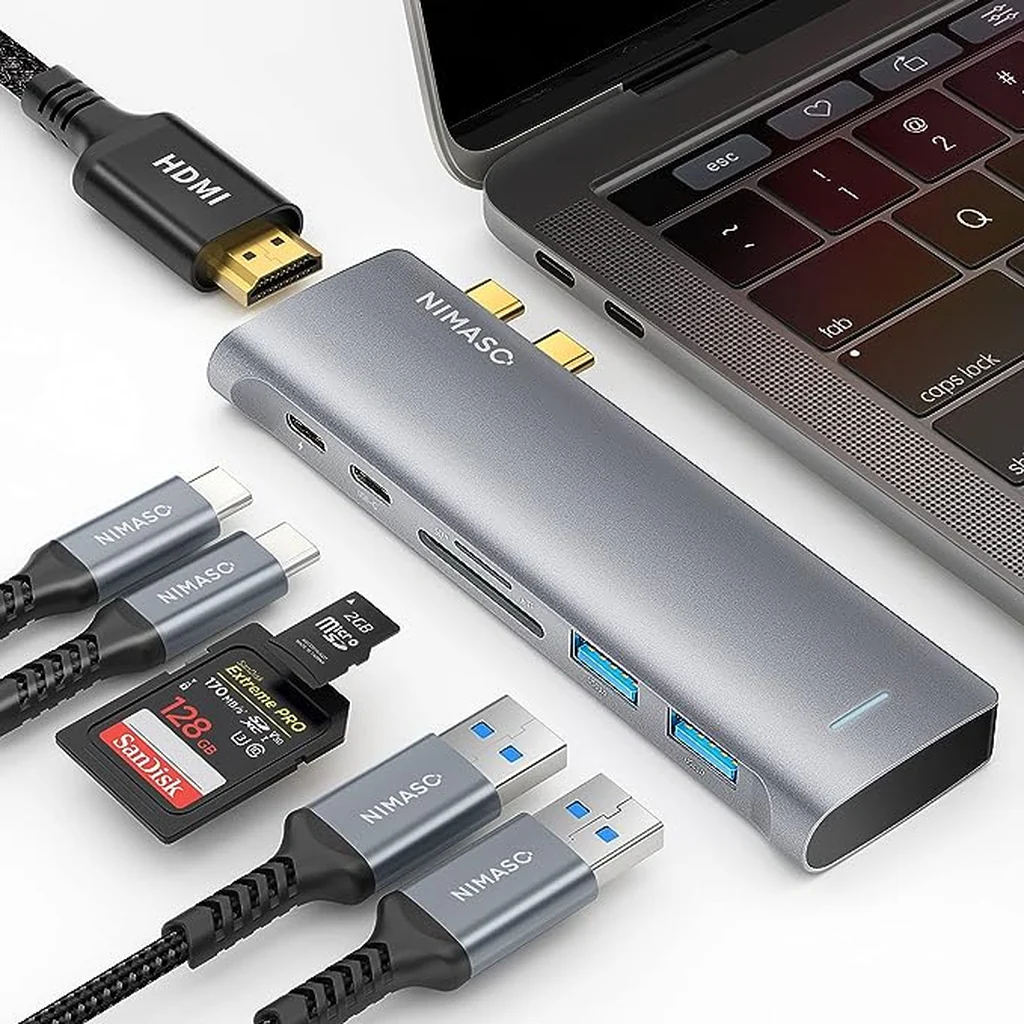
The Nimaso USB-C Hub 7-in-2 was designed to meet the needs of users of the MacBook Pro M1 and MacBook Air M1, two of the most recent and appreciated models from Apple. With this hub, you will have access to a variety of additional ports, which will allow you to connect easily to external devices and extend the capabilities of your MacBook.
USB-C Thunderbolt 3 Port (100 W PD)
One of the most impressive aspects of the Nimaso hub is the USB-C Thunderbolt 3 port, which not only allows you to transfer data at amazing speed, but also gives you fast charging of your MacBook with up to 100 W of power. This means you can charge your MacBook while using it or connect external devices that require additional power, without worrying about battery life.
4K HDMI Output for Exceptional Visual Quality
The Nimaso hub allows you to connect your MacBook to a monitor or a television with 4K resolution, offering you a stunning visual experience. With the 4K HDMI output, you can play video content, extend your screen or work at a high resolution without compromising image quality.
SD/TF Card Reader
If you need to transfer photos or files from SD or microSD cards, the Nimaso Hub offers you two card slots to do so with ease. This is useful for photographers, content creators or anyone who needs quick access to the data stored on their memory cards.
USB-C 3.0 Port and 2 x USB 3.0
The Nimaso hub comes with a USB-C 3.0 port, which allows you to transfer data at high speed between USB-C devices, such as compatible smartphones or tablets. It also includes two USB 3.0 ports, which give you the possibility to connect more USB devices to your MacBook. These USB 3.0 ports are compatible with USB 2.0 devices, but offer transfer speeds of up to 5 Gbps, which makes them ideal for devices with external storage or peripherals.
Compact and Durable Design
The Nimaso Hub is designed with attention to detail to match the design of your MacBook perfectly. It comes in an aluminium housing, which not only looks elegant, but is also durable, protecting the internal components. With its compact size and low weight, it is easy to carry in a bag or a handbag, so you can always have it at hand when you need it.
Universal Compatibility and Ease of Use
The Nimaso hub is compatible with a wide range of devices, not only the MacBook Pro M1 and MacBook Air M1. You can use it with laptops with USB-C, tablets, phones, and other compatible devices. It is plug-and-play, which means there is no need to install software or additional drivers. Simply connect it to the USB-C port of your device and you are ready to start extending your connectivity.
Conclusion
In conclusion, the Nimaso USB-C Hub 7-in-2 is a versatile and efficient device that offers you connection expansion for the MacBook Pro M1 and MacBook Air M1, without compromising on quality or performance. With multiple ports, including Thunderbolt 3, 4K HDMI, SD/TF card reader and USB 3.0, this hub meets the varied needs of modern technology users. Its compact design, durability and ease of use make it an essential accessory for those who want to maximise their efficiency and extend the capabilities of their devices. Choose the Nimaso USB-C Hub to make your MacBook a much more powerful and versatile tool.
Hub Details
Designed for MacBook Pro/Air: 7-in-2 USB C hub, compatible with MacBook Pro 13 inch, 15 inch, 16 inch 2020/2019/2018/2017/2016 and MacBook Air 2020/2019/2018. The aluminium alloy housing has a perfect feel. It fits fully on the interface of your MacBook when connected. Plug and play. Note: If your Macbook has a case, remove it before using the adaptor, and the light will come on to indicate that it is starting.